Last Verified: September 2026 — commands checked against Cloudflare’s official MCP docs
You ask Claude Code why a Worker returns 522s, and it can’t see your DNS, your SSL mode, or your logs. So you click through the Cloudflare dashboard, copy settings into the chat, and hope you didn’t miss the one that matters.
The Cloudflare API MCP server is Cloudflare’s official hosted server. It gives Claude Code the whole Cloudflare API, over 2,500 endpoints, through just two tools, and it costs about 1,100 tokens of context instead of hundreds of thousands. Setup is one command plus an OAuth sign-in where you pick the permissions.
Deploying on Vercel instead? See our Vercel MCP setup.
How it works
Quick Start
Run this in your project folder:
claude mcp add --scope project --transport http cloudflare-api https://mcp.cloudflare.com/mcpStart Claude Code, run /mcp, pick cloudflare-api, and approve access in the browser. Total time: about 1 minute. No token to paste.
⚡ Copy This Prompt: Let Claude Code Install and Verify It For You
Skip the manual steps below and hand the whole job to the agent instead:
You have shell access and the `claude mcp` CLI on this machine. Connect Cloudflare's official API MCP server to Claude Code for this project and report back. Do not tell me it's done unless step 4 actually confirms it:

1. Run `claude mcp list`. If a cloudflare-api entry already exists, show me its URL and stop instead of adding a second one.
2. Run:
   `claude mcp add --scope project --transport http cloudflare-api https://mcp.cloudflare.com/mcp`
3. Tell me to run `/mcp` in Claude Code, pick cloudflare-api, and finish the Cloudflare sign-in in my browser, granting read permissions only for now. Wait until I say it's done, then run `claude mcp list` and confirm cloudflare-api shows Connected.
4. Using only read calls, list my Cloudflare accounts, my zones (domains), and my Workers. For one zone, show its DNS records count and SSL mode. Don't create, edit, purge, or delete anything.

Never ask me to paste a Cloudflare API token into this chat. If any step fails, give me the exact error and the command that produced it. Do not skip ahead.The last step only reads, so you see what Claude can reach before it can change your DNS.
On this page (8 sections)
What You’ll Need
| Requirement | Why You Need It | Time |
|---|---|---|
| Claude Code installed | The client that calls the Cloudflare tools | 0 min |
| A Cloudflare account | The server acts with the permissions you grant | 0 min |
| A browser on the same machine | For the one-time OAuth sign-in and permission picker | 0 min |
How It Fits 2,500 Endpoints in 2 Tools
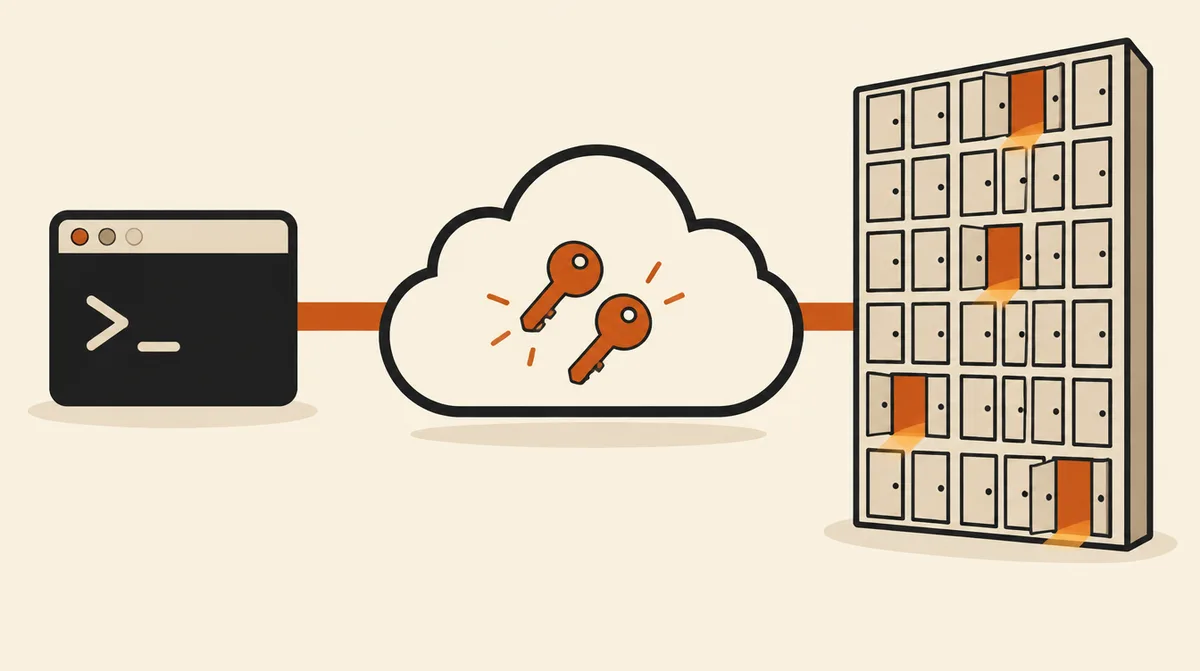
A normal MCP server exposes one tool per API call. For Cloudflare that would be about 2,500 tools and roughly 244,000 tokens of schemas before you type anything. Instead, the server uses what Cloudflare calls code mode:
| Tool | What It Does |
|---|---|
search | Claude writes a small JavaScript query against the API spec to find the right endpoints |
execute | Claude writes JavaScript that calls those endpoints on your account, including GraphQL analytics |
docs | Searches Cloudflare’s developer documentation |
The code runs in a sandboxed Worker on Cloudflare’s side, and only the result comes back to Claude Code. That’s why the whole thing costs about 1,100 tokens.
Step-by-Step Setup
Prefer to do it by hand instead of delegating to the agent? Here’s the manual version.
Step 1 — Add the server
~10 sec
--scope project writes the entry to .mcp.json in your repo, so teammates get the same server and each signs in as themselves. Use --scope user instead if you want it in every project:
claude mcp add --scope project --transport http cloudflare-api https://mcp.cloudflare.com/mcp
claude, approve it, then sign in with /mcp.Step 2 — Sign in and pick permissions
~30 sec
Inside Claude Code, run /mcp, select cloudflare-api, and authenticate. Cloudflare shows a permission picker. This is your only real safety switch, so start with read permissions and add write access later for the products you actually want it to change.
Step 3 — Add a focused server if you need one (optional)
~10 sec
Cloudflare also hosts smaller single-purpose servers. Add them the same way, for example Workers logs:
claude mcp add --scope project --transport http cloudflare-observability https://observability.mcp.cloudflare.com/mcp| Server | URL | Good For |
|---|---|---|
| Documentation | https://docs.mcp.cloudflare.com/mcp | Current Cloudflare reference, no account needed |
| Observability | https://observability.mcp.cloudflare.com/mcp | Worker logs and analytics while debugging |
| Workers Builds | https://builds.mcp.cloudflare.com/mcp | Why a Workers build failed |
| Radar | https://radar.mcp.cloudflare.com/mcp | Internet traffic trends and URL scans |
What It Can Do
| Job | Example Ask | Changes Anything? |
|---|---|---|
| Audit a zone | “List DNS records for example.com and flag any that aren’t proxied” | No |
| Debug errors | “Why is api.example.com returning 522? Check DNS, SSL mode, and origin rules” | No |
| Check traffic | “Show requests and cache hit ratio for the last 24 hours” | No |
| Inventory | “List my Workers, their routes, and which KV namespaces they bind” | No |
| Change config | “Add a CNAME for docs and purge the cache for /pricing” | Yes |
Verify It’s Actually Working
claude mcp list! cloudflare-api Needs authentication → run
/mcp and sign in (Step 2)✘ cloudflare-api Failed to connect → check the URL ends in
/mcp and the transport is http
Then ask for something only your account knows:
List my Cloudflare zones and the SSL mode for each one.If the domains and SSL modes match your dashboard, it’s working.
Common Mistakes to Avoid
- Granting everything at sign-in. There’s no separate read-only mode. What you tick on the permission screen is what the agent can do, including editing DNS and purging cache. Start with read access, and keep manual approval on for
execute; a Claude Code hook can enforce it. - Turning code mode off. Adding
?codemode=falsegives you one tool per endpoint and about 244,000 tokens of tool schemas. Leave it on unless you know why you need it. - Asking for everything at once. Results are capped at about 6,000 tokens and marked
--- TRUNCATED ---. Ask about one zone or one Worker at a time instead of lifting the cap. - Using an IP-restricted API token. Tokens with Client IP Address Filtering aren’t supported. Use OAuth, or a token without that filter.
- Copying an old
/sseURL. It still works, but new setups should use the/mcpendpoint.
Q&A
Is it free?
Cloudflare doesn’t list a price for its managed MCP servers. Anything the agent changes, like adding a Worker or a paid feature, is billed the same as doing it in the dashboard.
Can I use an API token instead of OAuth, e.g. in CI?
Yes. Create a token at dash.cloudflare.com/profile/api-tokens with only the permissions you need, then add it as a header. Single quotes keep the token itself out of .mcp.json, and Claude Code fills it in from your environment: claude mcp add --scope project --transport http cloudflare-api https://mcp.cloudflare.com/mcp --header 'Authorization: Bearer ${CLOUDFLARE_API_TOKEN}'. Account tokens need Account Resources: Read so the server can find your account ID.
What about the Cloudflare Skills plugin?
Cloudflare also publishes a Claude Code plugin with its MCP servers plus skills and slash commands: /plugin marketplace add cloudflare/skills. Use it if you build on Workers a lot. For DNS, logs, and settings, the single API server above is enough.
Is it safe to let an AI run code against my account?
The code runs in an isolated Worker on Cloudflare’s side, not on your machine, and it can only use the permissions you granted. The real risk is a bad change, which is why read-first permissions and manual approval matter.
Does it work in Claude Desktop or claude.ai too?
Yes, as a custom connector with the same URL. That connection is separate from the one in Claude Code.
Official Resources
- Cloudflare’s managed MCP servers — every server URL, OAuth and token auth
- cloudflare/mcp on GitHub — code mode, token limits, URL options
- Claude Code MCP docs —
claude mcp add, scopes, and OAuth with/mcp
If this guide got Claude Code reading your Cloudflare settings instead of you copying them out of the dashboard, follow us on X for more setup guides and prompt tips.