Tag: ChatGPT

  • 10 ChatGPT Photo Editing Prompts That Won’t Wreck the Face

    10 ChatGPT Photo Editing Prompts That Won’t Wreck the Face

    Type “fix this photo” into ChatGPT and you’ll usually get a face that looks airbrushed into someone else. That’s not a limit of the model — it’s a missing instruction. ChatGPT treats anything you don’t explicitly protect as fair game, skin included, so a one-line request leaves it guessing at everything you didn’t say.

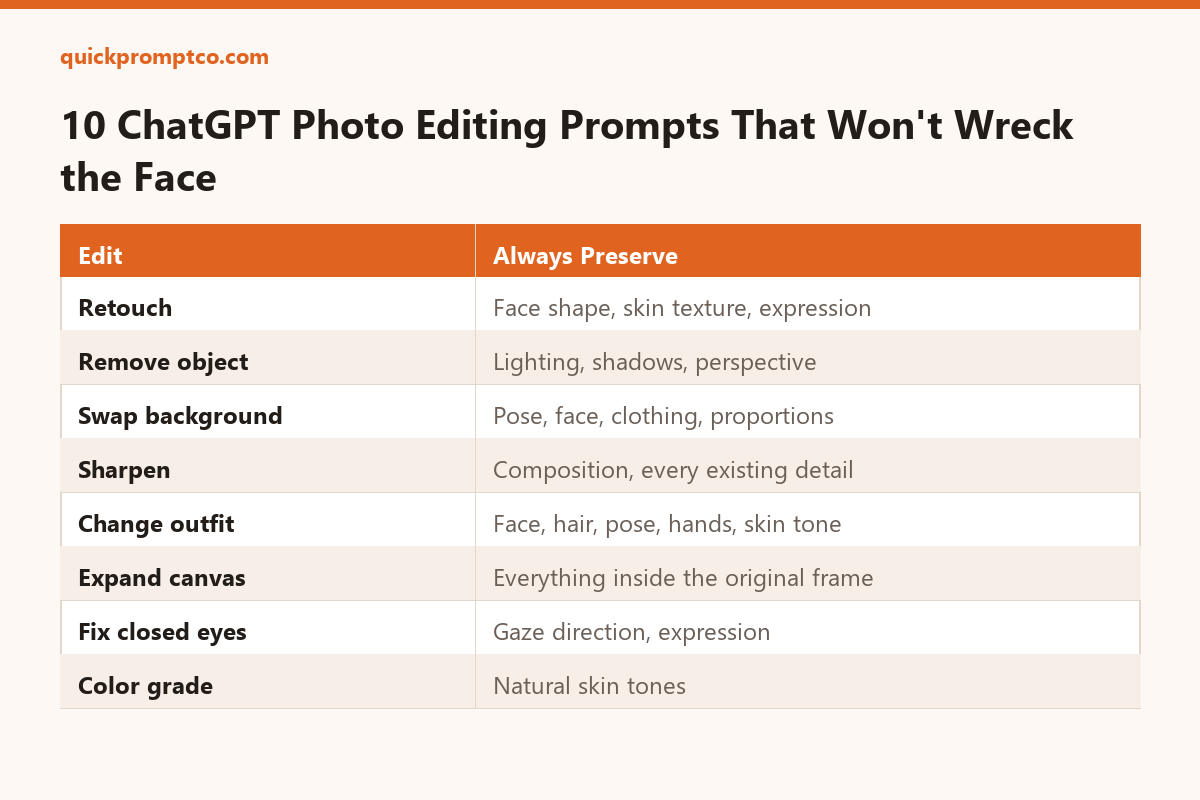
    The fix is a two-part prompt: say what to change, then say what to leave alone. The 10 prompts below are built that way, covering the edits people ask for most. Upload your photo first, then paste whichever one matches what you need.

    1. Professional Retouch

    For everyday portraits that just need cleanup, not a makeover.

    Retouch this photo professionally — even out skin tone, reduce blemishes, sharpen focus, and balance lighting and color. Do not change the person's face shape, features, proportions, hairstyle, or expression. Keep the result looking like a real, unedited photo of the same person.

    2. Remove an Unwanted Object or Person

    For photobombers, stray objects, or background clutter.

    Remove [describe the object or person] from this photo and rebuild what's behind it. Match the existing lighting, shadows, texture, and perspective so the area looks like it was never disturbed.

    3. Swap the Background

    For changing the setting without reshooting.

    Replace the background with [describe the new background] and keep the subject exactly as they are — same pose, face, hair, clothing, and proportions. Adjust the lighting and color on the subject so they look like they were actually photographed in the new setting.

    4. Sharpen Without Losing Realism

    For blurry, low-res, or poorly lit photos.

    Sharpen and clean up this photo — improve resolution, reduce blur, and correct exposure — while keeping the composition, subject, and every detail exactly as they are. Avoid any artificial or over-processed look.

    5. Change the Outfit

    For trying on a different look without a reshoot.

    Change the outfit to [describe the new outfit], fitted naturally to the body. Keep the person's face, hair, pose, hands, skin tone, and background completely unchanged.

    6. Expand the Canvas

    For turning a tight crop into a wider shot.

    Extend this photo to a [aspect ratio or size] canvas by continuing the existing background naturally in every direction. Do not alter anything currently inside the frame.

    7. Shift the Time of Day

    For turning a flat afternoon shot into golden hour or night.

    Change the lighting in this photo from [current time of day] to [golden hour / blue hour / night], adjusting the sky, shadows, and color temperature to match — without changing the subject or composition.

    8. Open Closed or Squinting Eyes

    For the one shot in the burst where everyone’s eyes were open — except one person.

    Fix the person's closed or squinting eyes so they appear naturally open, matching their gaze direction and expression. Keep every other part of the face and photo unchanged.

    9. Smooth Wrinkled Clothing

    For creased shirts and rumpled fabric in an otherwise good shot.

    Smooth out the wrinkles and creases in the clothing while keeping the fabric's texture, fit, and folds looking natural — not flattened or painted-on. Leave the rest of the photo untouched.

    10. Apply a Cinematic Color Grade

    For giving a flat photo a finished, intentional look.

    Apply a cinematic color grade to this photo — balance the highlights and shadows, and adjust contrast and saturation for a polished, consistent tone. Keep skin tones natural and leave the subject and composition unchanged.

    Why These Prompts Work

    Every prompt above follows the same shape: an instruction for what to change, and a separate instruction for what to leave alone. ChatGPT treats an unprotected photo as fully editable, so skipping the second half is what causes faces to drift, skin to over-smooth, or backgrounds to shift in ways you didn’t ask for.

    When the result comes back, compare it side-by-side with the original. Check that the thing you wanted changed actually changed, and that everything else still looks like the same person in the same photo. If something drifted, name it specifically in your next message — “the skin looks too smoothed, keep more natural texture” — instead of retyping the whole prompt from scratch.

  • How to Cut Your ChatGPT Usage in Half Without Losing Output Quality

    How to Cut Your ChatGPT Usage in Half Without Losing Output Quality

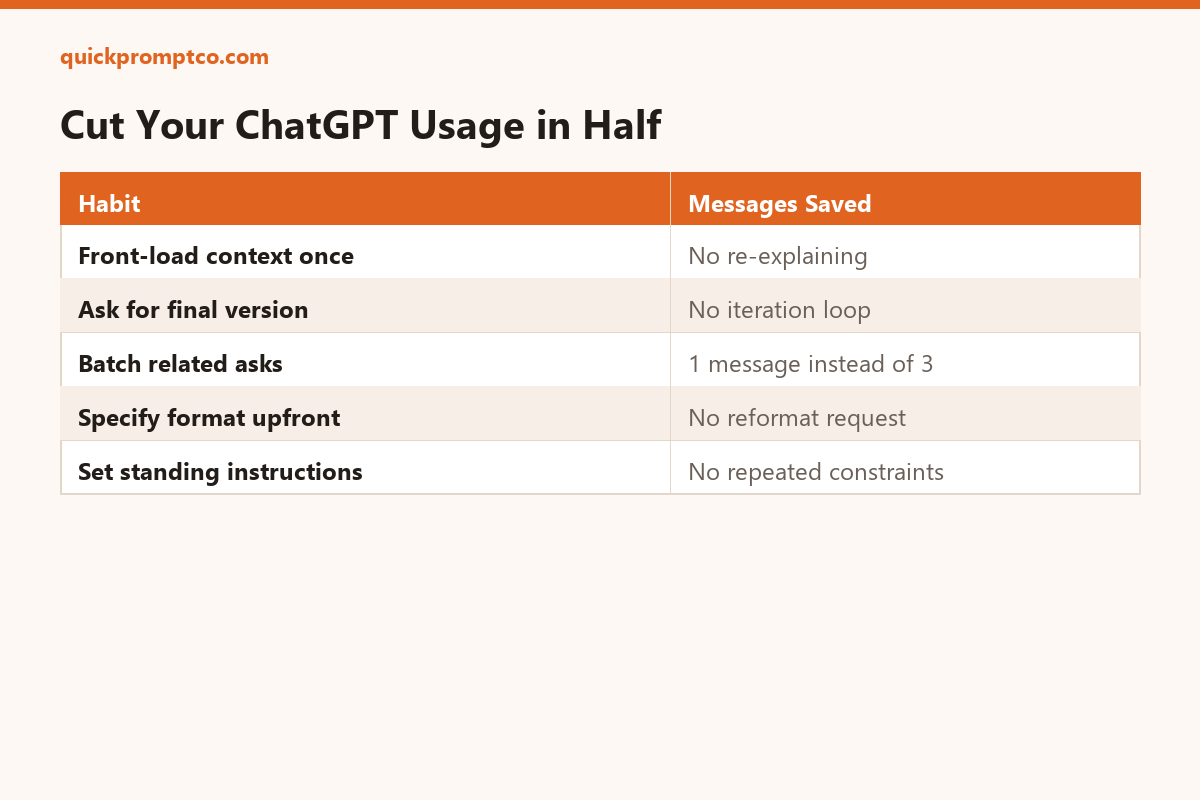
    Most wasted ChatGPT usage doesn’t come from asking hard questions — it comes from re-explaining context you already gave, and sending a second message just to fix the format of the first answer. Here’s how to fix that.

    1. Front-load your context once, not gradually

    Before I ask anything, here's the full context: [role, project, constraints, audience]. Keep this in mind for everything I ask in this conversation — don't ask me to repeat it.

    2. Ask for the finished version, not a draft to iterate on

    Give me your best, final version on the first attempt — don't hedge or hold back detail. If something is genuinely ambiguous, state your assumption and proceed anyway instead of asking me first.

    3. Batch related asks into one message

    I need three things from the same source text: a 1-sentence summary, a list of action items, and a tone check. Do all three in one response, clearly labeled: [paste text]

    4. Specify the output format up front

    Answer in [a table / 5 bullets / plain paragraph] only — no preamble, no closing summary, no "let me know if you'd like changes."

    5. Set a standing instruction once instead of repeating it

    If you find yourself typing the same constraint every time (“keep it under 100 words,” “write for a non-technical audience”), put it in ChatGPT’s custom instructions setting once instead of retyping it in every conversation.

    Why this works

    Every follow-up message that exists only to add missing context or fix formatting is a message you didn’t need to send. Saying more up front costs less than correcting less later.

  • 5 Prompt Mistakes That Are Quietly Wasting Your ChatGPT Credits

    5 Prompt Mistakes That Are Quietly Wasting Your ChatGPT Credits

    Bad prompts don’t just give worse answers — they cost you extra back-and-forth, which is where most wasted usage actually comes from.

    1. Asking for the whole thing at once

    “Write me a full marketing plan” produces something generic you’ll rewrite anyway. Break it into stages: audience, positioning, channels, then copy — each one gets a sharper answer because the model isn’t guessing what you actually need.

    2. Not saying what to leave out

    If you don’t say “no intro, no summary at the end,” you’ll get both, every time. Negative constraints save you an editing pass.

    3. Vague length requests

    “Keep it short” means something different to every model on every day. “Under 100 words” or “3 bullet points” removes the guesswork entirely.

    4. Re-explaining context every message

    If you’re repeating the same background info in every follow-up, put it once at the top of the conversation as a block the model can refer back to, instead of restating it each time.

    5. Not specifying the output format upfront

    Asking for a table after already getting three paragraphs of prose means redoing the whole response. State the format in the first prompt, not as a correction.

    The pattern

    Every one of these mistakes causes an extra round trip. Fixing them isn’t about being clever — it’s about giving the model everything it needs the first time.

  • 10 ChatGPT Prompts That Actually Save You Time at Work

    10 ChatGPT Prompts That Actually Save You Time at Work

    Most “ChatGPT prompt” lists are filler. These ten are ones you can copy, paste, and use today — each one solves a specific, recurring task instead of a vague one-off.

    1. Turn a messy meeting into action items

    Here are my raw meeting notes: [paste notes]. Turn these into a clean list of action items, grouped by owner, with any deadlines called out separately.

    2. Rewrite an email to match a tone

    Rewrite this email to sound more [direct/friendly/formal], keeping the same information: [paste email]

    3. Summarize a long document into 5 bullets

    Summarize the following into exactly 5 bullet points, ordered by importance: [paste text]

    4. Turn bullet points into a slide outline

    Turn these bullet points into a 5-slide outline, one idea per slide, with a suggested slide title for each: [paste bullets]

    5. Draft a difficult message

    Help me draft a message to [person/role] about [situation]. Be direct but not confrontational, and keep it under 100 words.

    6. Compare two options side by side

    Compare [option A] and [option B] in a table across these criteria: cost, time, risk, and long-term impact.

    7. Turn a question into a checklist

    Turn this into a step-by-step checklist I can follow: [paste question or task]

    8. Explain something to a specific audience

    Explain [topic] as if you were writing for [a new hire / a non-technical manager / a client]. Keep it under 150 words.

    9. Find the gaps in a plan

    Here's my plan: [paste plan]. What's missing, and what could go wrong that I haven't accounted for?

    10. Turn feedback into a revision plan

    Here's feedback I received: [paste feedback]. Turn this into a prioritized list of changes to make, starting with the most important.

    Why these work

    Each prompt gives the model a clear input, a clear output format, and a clear constraint (length, structure, or tone). That combination is what separates a useful prompt from a vague one — not clever wording.