Tag: General

  • 6 Prompts to Stop AI Writing From Sounding Robotic

    6 Prompts to Stop AI Writing From Sounding Robotic

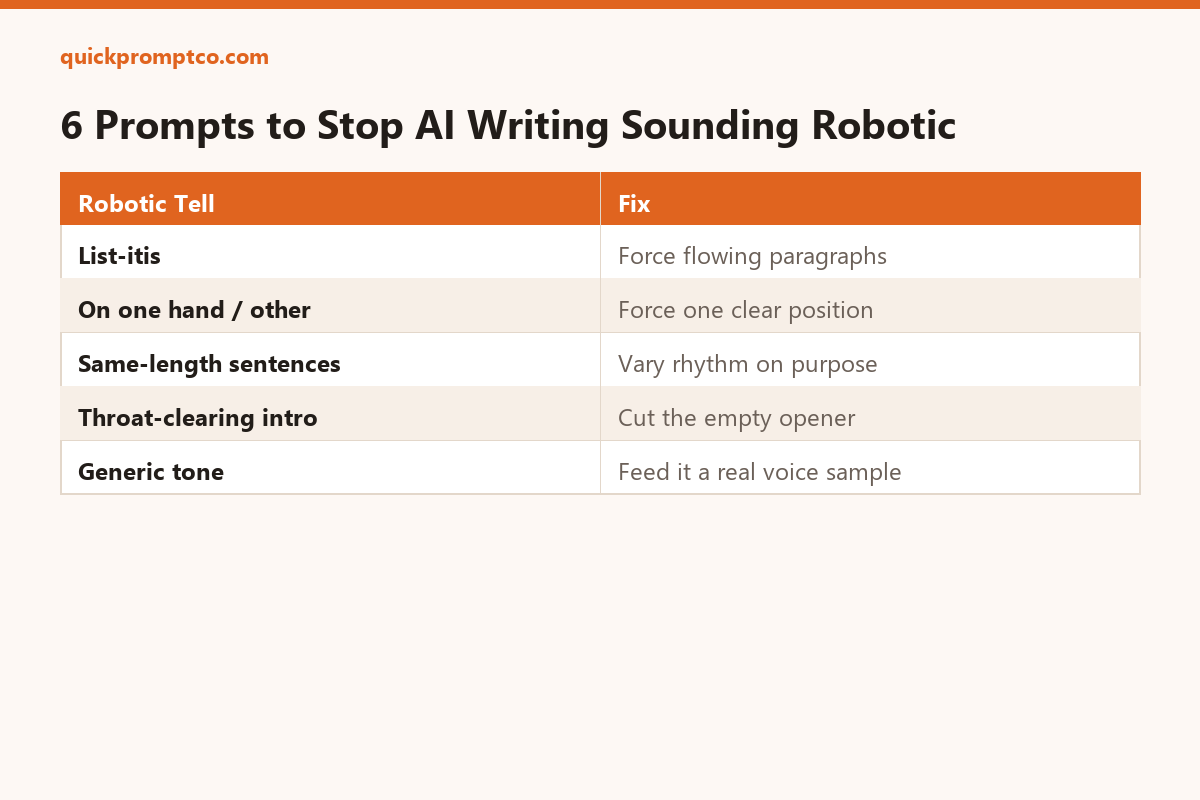
    AI writing usually gets called out for its rhythm and structure, not its word choice — the same three-part lists, the same hedge-then-hedge-again sentences, the same “in conclusion” wrap-up. These prompts target the actual tell.

    1. Ban the list-itis

    Rewrite this as flowing paragraphs, not bullet points or numbered lists, unless a list is genuinely the clearest way to present it: [paste text]

    2. Force one clear position instead of “on one hand, on the other”

    Take a clear position on this instead of presenting both sides equally. State your actual recommendation in the first sentence: [paste topic]

    3. Vary sentence length on purpose

    Rewrite this so sentence length varies noticeably — mix short, punchy sentences with longer ones. Avoid every sentence being roughly the same length: [paste text]

    4. Cut the throat-clearing opener

    Delete any opening sentence that doesn't contain new information (e.g. "In today's fast-paced world..."). Start with the actual point: [paste text]

    5. Feed it a sample of your real voice

    Here's a sample of how I actually write: [paste your own text]. Match this tone, sentence rhythm, and vocabulary level when you rewrite the following: [paste text to rewrite]

    6. Run the read-aloud test

    Read this out loud in your head. Flag any sentence that a real person wouldn't naturally say out loud, and rewrite just those: [paste text]

    Why this works

    None of these change vocabulary — they change structure and rhythm, which is what actually reads as “AI-written” to most people, far more than any individual word choice does.

  • How to Turn Any Tutorial Video Into a Step-by-Step AI Checklist

    How to Turn Any Tutorial Video Into a Step-by-Step AI Checklist

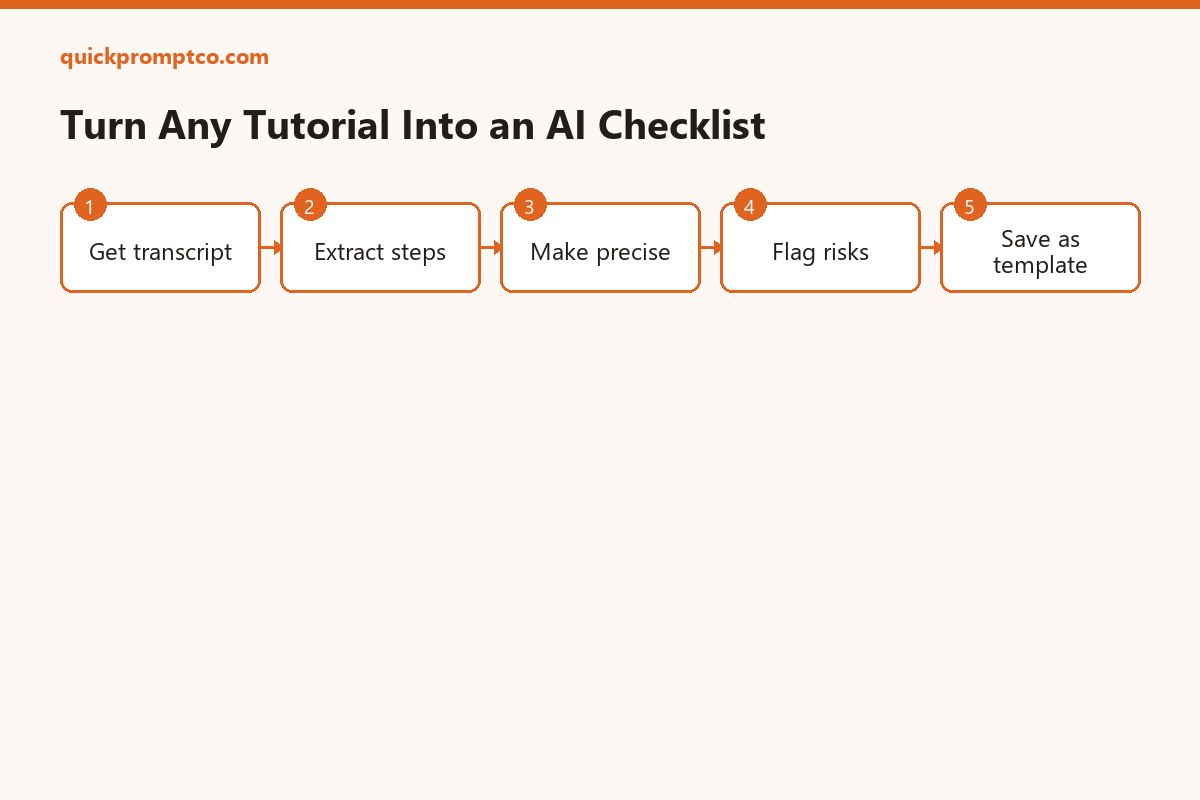
    You watch a 20-minute tutorial, nod along, and five minutes later can’t remember the exact order of steps. The fix isn’t rewatching — it’s turning the transcript into a checklist once, with a prompt that does the extraction for you.

    1. Get the transcript

    Most platforms already have one: on YouTube, click the “…” below a video, then “Show transcript,” and copy the text. No transcript available? A rough one from the video’s captions still works fine for this.

    2. Extract only the actionable steps

    Here is a transcript of a tutorial: [paste transcript]. Extract only the actionable steps in the exact order they should be performed, numbered, one sentence each. Skip explanations, tangents, and filler.

    3. Turn vague steps into precise ones

    Some of these steps are vague (e.g. "configure the settings"). Rewrite each one to be specific enough that someone with no prior context could follow it exactly: [paste extracted steps]

    4. Add a “what could go wrong” section

    For this checklist, add a short section listing the 3 most likely mistakes someone would make at each stage, and how to catch them: [paste checklist]

    5. Save it as a reusable template

    If it’s a workflow you’ll repeat (not a one-off task), ask for a version with blanks in place of the specific values used in the video, so you can reuse the same checklist next time with different inputs.

    Why this works

    A tutorial is optimized for explaining, not for doing — it’s full of context, asides, and “why” that you only need once. A checklist strips that away and leaves only what you need mid-task.

  • How to Prompt AI for Better Product Photos (Without a Studio)

    How to Prompt AI for Better Product Photos (Without a Studio)

    You don’t need a lightbox and a camera to get clean product shots anymore. AI image tools can turn a rough phone photo into something close to studio quality — if you prompt for the right things.

    Start with a clean base shot

    AI editing tools work best correcting and enhancing an existing photo, not inventing a product from nothing. Take the photo on a plain background with even lighting first, then let the prompt do the polishing.

    Prompt for lighting, not just “make it better”

    Enhance this product photo with soft studio lighting from the upper left, remove harsh shadows, keep the product's true colors accurate

    Prompt for background replacement

    Replace the background with a seamless light gray studio backdrop, keep the product's shadow realistic and soft, do not alter the product itself

    Prompt for a lifestyle context shot

    Place this product on a wooden table near a window with natural daylight, soft shadows, no other objects in frame, photorealistic

    What to avoid

    Don’t ask the model to “make it look professional” with no specifics — that’s the single vaguest instruction you can give an image model. Name the lighting direction, the background, and what must stay unchanged (the product itself) every time.

    A reusable template

    [Action: enhance/replace background/add context], [lighting description], [background description], keep the product accurate and unaltered

  • Claude vs ChatGPT vs Gemini: Which One Should You Actually Use in 2026?

    Claude vs ChatGPT vs Gemini: Which One Should You Actually Use in 2026?

    Most comparisons of these three tools list features. This is about which one to actually reach for, task by task.

    For long documents and research synthesis

    Gemini’s large context window makes it the strongest option when you need to drop in a huge document, a long PDF, or several files at once and ask questions across all of them without pre-summarizing.

    For coding and technical work

    Claude is generally the strongest for multi-file coding tasks, following detailed technical instructions precisely, and agentic workflows that involve running commands or editing code directly rather than just suggesting snippets.

    For everyday writing and quick answers

    ChatGPT remains the most well-rounded default for general writing, brainstorming, and quick day-to-day questions, especially with its wide plugin/tool ecosystem and voice mode.

    For following complex, detailed instructions exactly

    Claude tends to stick closest to explicit constraints (format, length, tone) when you spell them out clearly, which matters most for structured or professional output you can’t spend time re-prompting.

    The honest answer

    If you can only pick one: ChatGPT is the safest generalist default. If your work is code-heavy or instruction-heavy, Claude is worth the switch. If you regularly work with long documents, Gemini’s context window is a real advantage. Most power users end up with two, not one.

  • The Prompt Framework That Makes AI Answers Actually Useful

    The Prompt Framework That Makes AI Answers Actually Useful

    Vague prompt in, vague answer out. Most bad AI answers trace back to a prompt missing one of four things. This is the framework: Role, Task, Format, Constraint (RTFC).

    Role — who should the AI act as?

    Give it a perspective. “Act as a skeptical editor”, “act as a senior backend engineer”, “act as a first-time customer”. A role narrows the tone and priorities without you having to spell them all out.

    Task — what exactly do you want done?

    Replace vague verbs with precise ones. Not “help me with this email” — instead “shorten this email to 3 sentences while keeping the ask clear.”

    Format — what shape should the output take?

    Bullet list, table, JSON, a single paragraph, a script with numbered scenes — say it explicitly. Models default to prose unless told otherwise, and prose is rarely what you actually need for a re-usable output.

    Constraint — what are the boundaries?

    Length limits, tone, things to avoid, required elements. “Under 100 words”, “no jargon”, “must include a call to action” — constraints are what separate a generic answer from one you can use as-is.

    Putting it together

    Act as [role]. [Task, stated precisely]. Output as [format]. Constraints: [list].

    Example: Act as a skeptical technical reviewer. Review this product description for unsupported claims. Output as a bullet list, one issue per line. Constraints: under 150 words, cite the specific sentence for each issue.

    Why this beats “be more specific”

    “Be more specific” is true but not actionable. RTFC gives you four concrete slots to fill, and if any one of them is missing, that’s usually exactly where the output falls short.