
README checked: November 9, 2026 — read the README (Craft Anything v0.5.0); we have not installed it ourselves
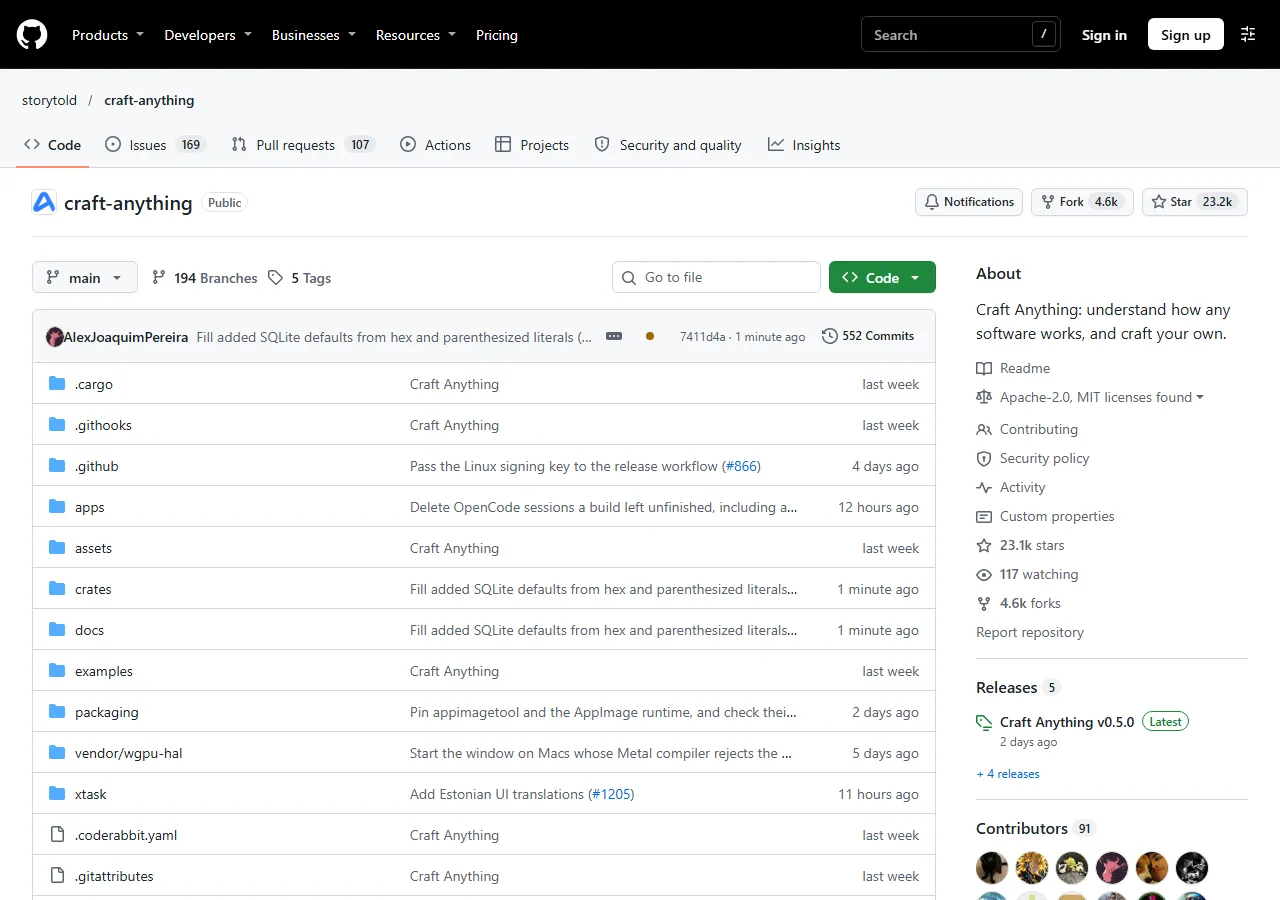
Most of us pay every month for a few simple apps: a habit tracker, a notes app, a small website builder. Craft Anything is a free, open-source app that studies how a website, app or game looks and works, then has Claude Code build your own new version from scratch. It reached about 24,000 GitHub stars in its first ten days.
Here’s the honest version of the idea from our Short: try it on an app you pay for, and use your own version free. What you need, how to install it, and the order to follow.
This is Bunji’s Free Find #5 — a free AI tool every week. Follow @bunjiai on YouTube.
In this guide: at a glance · how it works · install · your first project · where people get stuck · the copyright line · similar tools · FAQ
On this page (10 sections)
At a Glance
| Details | |
|---|---|
| Cost | Free and open source. The building is done by Claude Code, which runs on your own Claude plan. |
| You need | Claude Code installed and signed in. Windows, macOS or Linux (FreeBSD too). Rust 1.97+ only if you build from source. |
| License | MIT or Apache-2.0, your choice. The ArtCraft name and logos are trademarks and not covered. |
| GitHub | About 24,000 stars. Created October 31, 2026; latest release v0.5.0 on November 6; code updated daily. |
| Status | Early alpha. Websites work best today; app and game checks are partly there. |
| Good for | Anyone who pays monthly for a simple app or site and wants their own version. Not for copying apps to sell. |
| Made by | The ArtCraft team and contributors. Not made by Anthropic. |
Numbers from GitHub on November 9, 2026.
How It Works
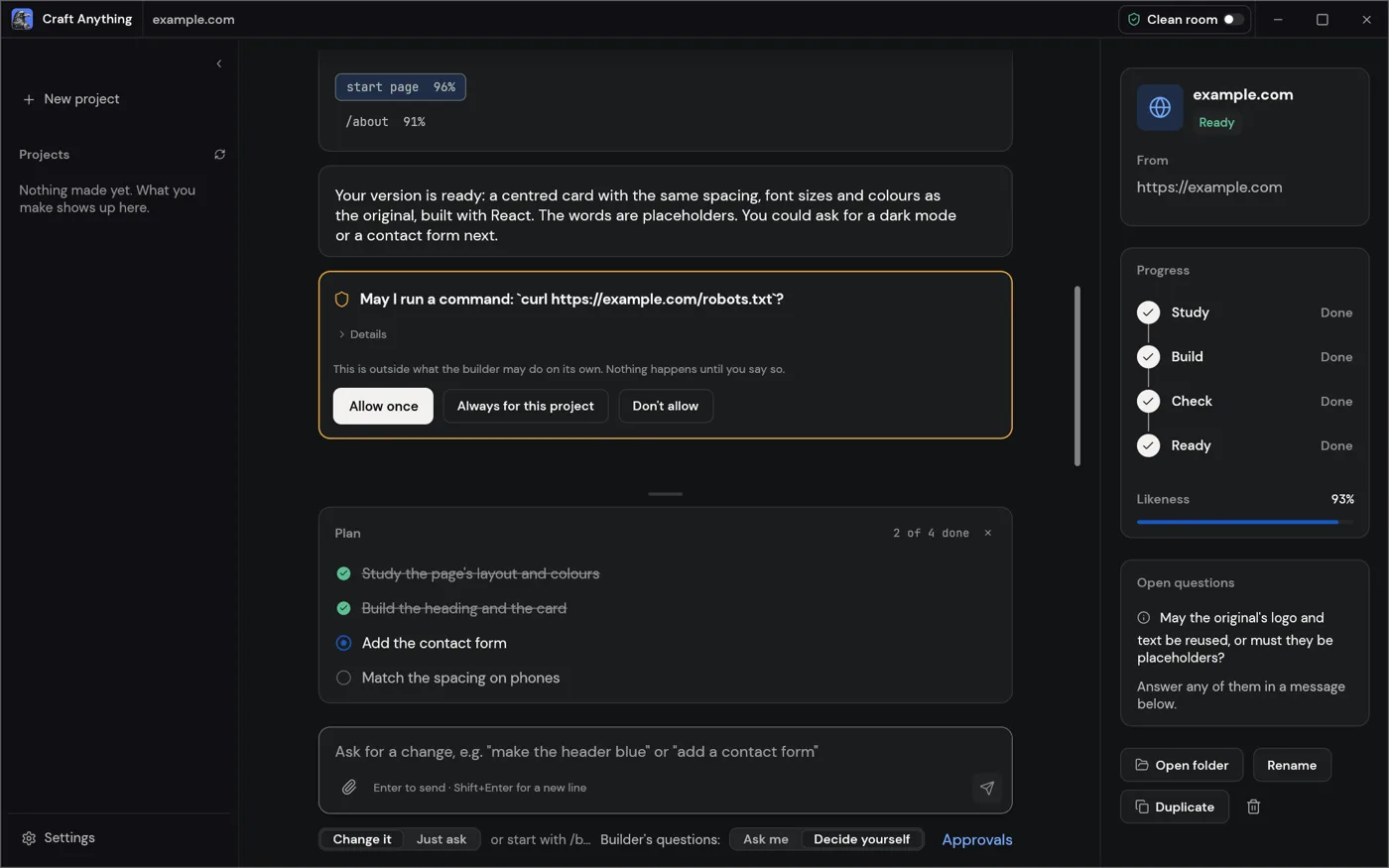
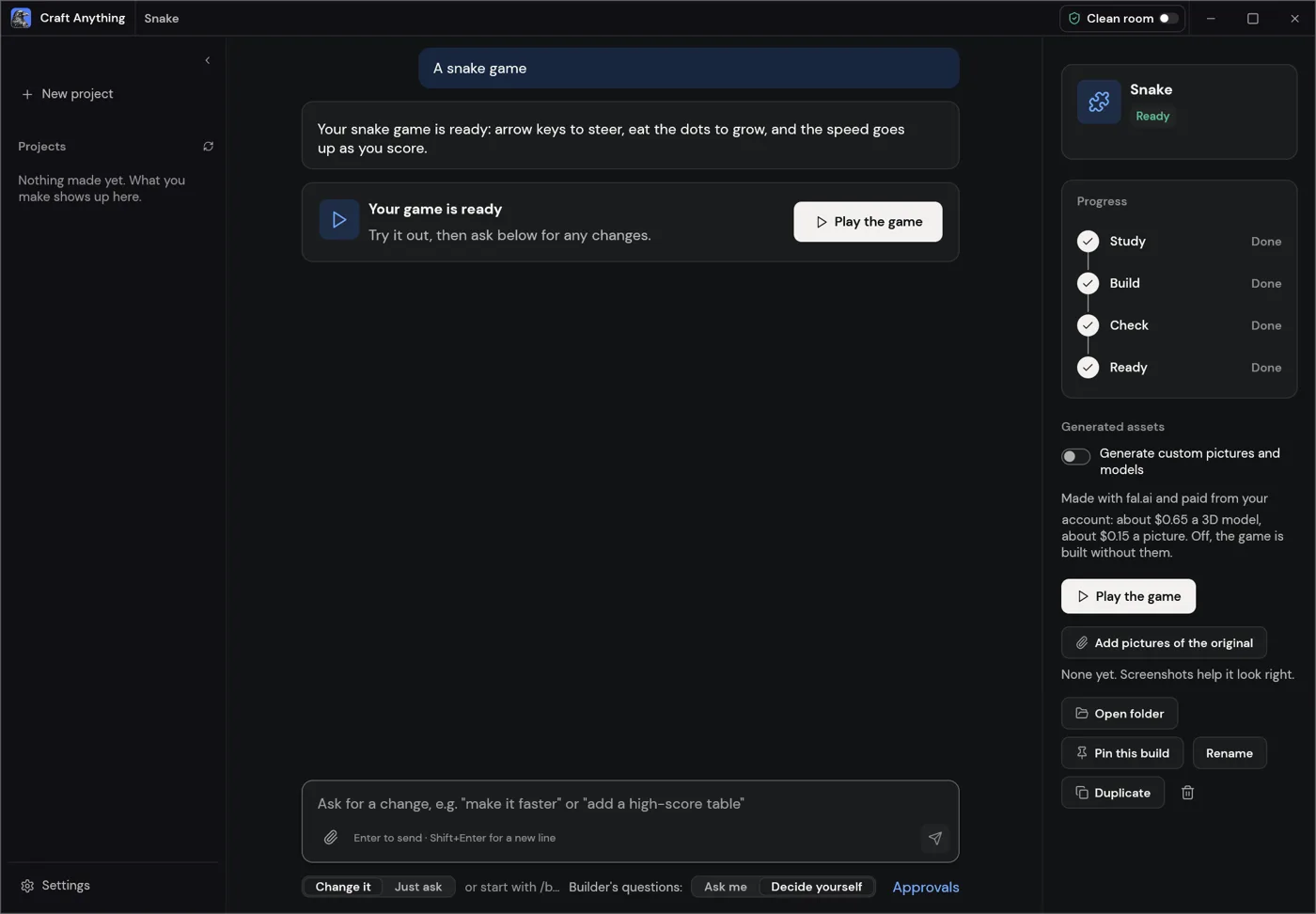
You point it at a target, say what you want, and press Start. Per the README, it then works in four steps and asks you in plain words when a decision is yours:
| Step | What happens |
|---|---|
| 1. Study | It looks at the original: its pages at every screen width, layout, colors, fonts, spacing and menus. |
| 2. Build | Claude Code builds a brand-new project, in the language or framework you ask for (or a sensible default). |
| 3. Check | It compares the build with the original and lists what doesn’t match yet. Websites are checked at three screen widths. |
| 4. Ready | You open or preview the result, or ask for changes and it refines it. |
In the README’s own website example, the pages came out 91% to 96% alike.
⚡ Copy This Prompt: Let Claude Code Install and Verify It For You
Already use Claude Code? Paste this into it and let it do the install from source, check it, and report back. Every command is from the README:
You have shell access on my machine. Install Craft Anything from its README and report back. Do not tell me it's done unless step 4 actually confirms it.

1. Run `rustc --version`. It needs Rust 1.97 or newer; if it's older, run `rustup update`. If Rust isn't installed, stop and ask me.
2. Run `git clone https://github.com/storytold/craft-anything && cd craft-anything`.
3. Run `cargo install --path apps/craft-anything-cli`.
4. Run `craft-anything-cli doctor` and show me its output: the install, the coding agents it found and the engines.
5. Tell me in a few lines what doctor says is missing, if anything.

If any step needs a login, a password, an account or a payment, stop and ask me first. Don't start a rebuild of any app or website.We built this prompt from the README’s own commands and haven’t run it ourselves. Prefer a normal installer? Skip this box and use Way 1 below.
Install
Before you start: Claude Code, signed in
~1 min
Craft Anything runs your own, unmodified claude program with your own sign-in, and never handles your account. Check that it’s installed:
claude --versionIf it says “not found”, install Claude Code and sign in first. The README lists GitHub Copilot and Grok Build as other builders, but Claude Code is the one supported first.
Way 1. Download the installer (easiest)
~3 min
Open the latest release and pick your file. <ver> is the version number:
| Your computer | File |
|---|---|
| Windows (most PCs) | craft-anything-<ver>-windows-x64.msi |
| Mac (Apple silicon or Intel) | craft-anything-<ver>-macos-universal.dmg |
| Linux | craft-anything-<ver>-linux-x86_64.AppImage, or the .deb / .rpm |
Per the README, the Windows installers are code-signed and the Mac app is signed and notarized. On Linux, skip the Flatpak: it can’t open a browser, which studying websites needs.
Way 2. Build from source (developers)
~10 min
Needs Rust 1.97 or newer (rustup update). Then:
git clone https://github.com/storytold/craft-anything && cd craft-anything
cargo run --release -p craft-anything                # the desktop app
cargo install --path apps/craft-anything-cli         # the CLI, as `craft-anything-cli`
craft-anything-cli doctor # checks the install, coding agents and enginesdoctor tells you what’s missing, including whether a coding agent is signed in.
Your First Project: An App You Pay For
1. Pick one small app
~2 min
Choose one app you pay for monthly and mostly use for a few simple screens. Write down the 3 or 4 things you actually do in it. That list is your request. A small app with a clear job is a much better first try than a big one.
2. Open Make my own version
~1 min
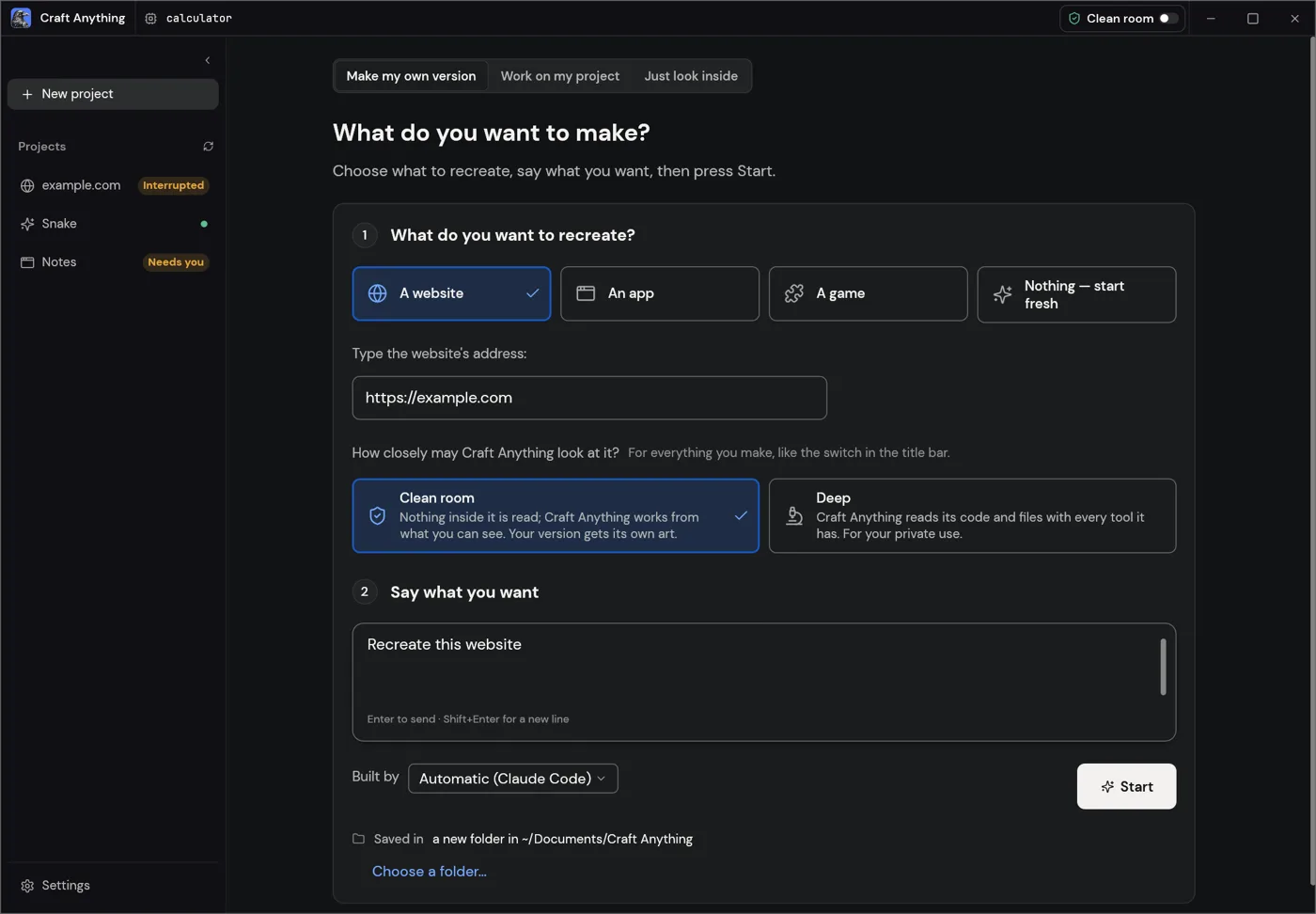
In the app’s default Simple mode, choose A website, An app or A game, then type the website’s address. For a desktop or phone app, it works from pictures: ones you add, or a picture of the app’s window when you allow it.
3. Keep Clean room on
~10 sec
Clean room is the default. Nothing inside the original is read, not its code, files or page source. It works only from what a visitor can see, and the Make screen says your version gets its own art.
It never bypasses logins, so for screens behind your account, add your own screenshots of them.
4. Say what you want, in your words
~2 min
The README’s example request is simply Recreate this website. For your own version, say what to keep and what to change, for example:
Make my own version of this habit tracker. Keep the daily check-in and the weekly chart. Use my own name, colors and icons.Leave Built by on Automatic (Claude Code) and press Start.
5. Answer its questions, then check the result
varies
The project page shows Study → Build → Check → Ready, what the agent is doing in plain words, and how alike the result is. When it asks before running a new kind of command (like npm or cargo), read it before you allow it.
At Ready, open or preview your version. Want changes? Type them in the box at the bottom. Your project is saved in Documents/Craft Anything.
Don’t hit “always allow” too fast
Installing a project’s packages runs code on your computer. The README warns that always allowing npm lets every later npm command run without asking, so only do that for a project you trust.
Where People Get Stuck
From the project’s GitHub issues, with what the team said. We haven’t hit these ourselves, since we didn’t install it.
- The app doesn’t open on Windows. On some Intel graphics drivers it crashed before showing a window. The team changed it to use DirectX 12 or Vulkan instead of OpenGL on Windows, so update to the latest release first. (details)
- It can’t find Claude Code. What matters is where Claude Code is installed, not where Craft Anything is. The team added more places it looks (WinGet, nvm, npm) and asks for the output of
where claudeandclaude --versionif it still can’t. (details) - A build sits at “checking its work” for hours. A fix landed on November 9: each round of checks now stops after 30 minutes, Pause works between checks, and the feed names the check that’s running. (details)
- The plan finishes but the chat stops responding. Still open on November 9. Restarting the app sometimes helps; the team is collecting details. (details)
The Copyright Line
Your version is for you, unless you make it yours
Copying someone else’s app design, logo or name and releasing it publicly can break copyright and trademark law. Keep a close copy for personal use and learning. If you want to share or sell it, change it to your own name, design and content first.
The README says the same: use it on software you own or are allowed to examine, and the agent is told not to copy logos, photos or text unless you own them or have permission. Deep mode reads an app’s code and files and is meant for your private use; many paid apps’ terms forbid that, so stay in Clean room for them.
Similar Tools
| Tool | How it works | Cost |
|---|---|---|
| Craft Anything | Desktop app. Studies a site, app or game, Claude Code builds a new one, then it checks how close it got. | Free app; uses your Claude plan |
| screenshot-to-code | Open source. Turns a screenshot or a web address into front-end code. No check against the original. | Free; you pay for your own AI key |
| v0 by Vercel | Hosted app builder. You describe the app (or paste a screenshot) in a chat and it builds it online. | Free plan with limits, paid plans |
Pick Craft Anything if you want it on your own computer with a check against the original. Pick a hosted builder if you’d rather not install anything.
Prefer the Terminal?
Every tool is also a CLI command and an MCP tool. From the README, a rebuild from the command line (questions are asked in the terminal):
craft-anything-cli rebuild https://example.com "Recreate this website"
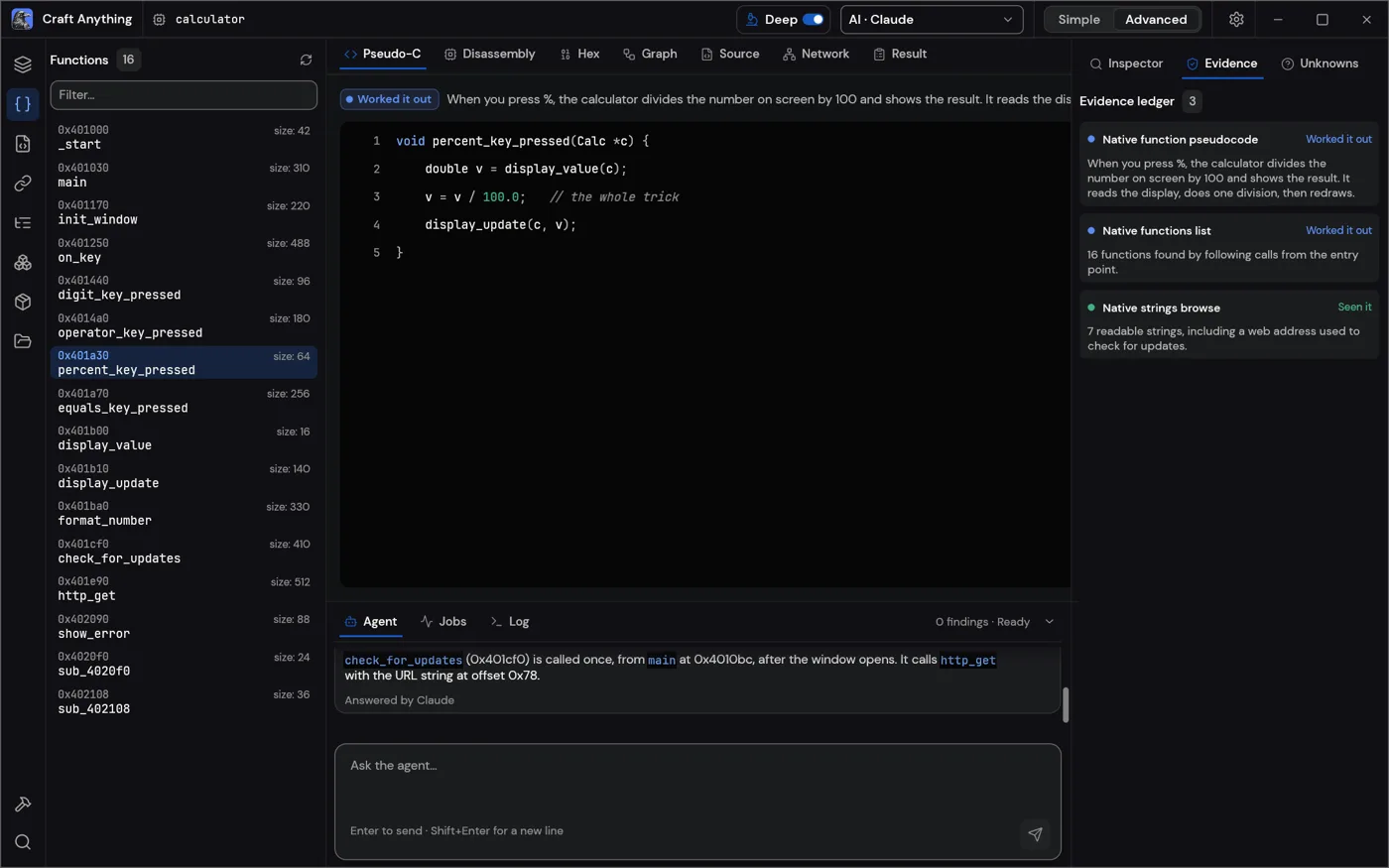
craft-anything-cli rebuild https://example.com "Make the header blue" --continue-in "<project folder>"To let another agent drive it, craft-anything-cli mcp serves the tools to any MCP client. The app also has an Advanced mode for developers, with every inspection tool in one workbench.
Bunji’s Free Find series
This guide goes with Free Find #5, our weekly Short about one free AI tool. Subscribe to @bunjiai on YouTube for the next one.
← Previous: Free Find #3: ECC
Official Links
- storytold/craft-anything on GitHub (README, MIT or Apache-2.0)
- Latest release and installers
- How it uses Claude Code
- What works today
FAQ
Is it really free?
Craft Anything itself is free and open source. The building is done by Claude Code, which uses your own Claude plan. Cancel the paid app only after your version does the things you need.
Can it copy any app perfectly?
No. In Clean room it works from what it can see and checks how close it got, then refines. It’s early alpha, and the README says behavior checks for apps and games are only partly there. Websites are the most complete today.
Do I need to know how to code?
Not for the Simple mode: pick a target, describe what you want, press Start. Knowing a little helps when you read its questions and approval cards.
Does it see my passwords or account?
It runs your own claude program with your own sign-in and never handles your account. It doesn’t bypass logins, so it only sees what you show it.
Did you test it?
Not yet. Everything here comes from the README for v0.5.0, read on November 9, 2026.
Related
More free AI tools on our guides page, like ECC and Agent Reach.
Craft Anything by the ArtCraft Team and contributors, MIT or Apache-2.0: github.com/storytold/craft-anything. The ArtCraft name and logos are the ArtCraft Team’s trademarks.